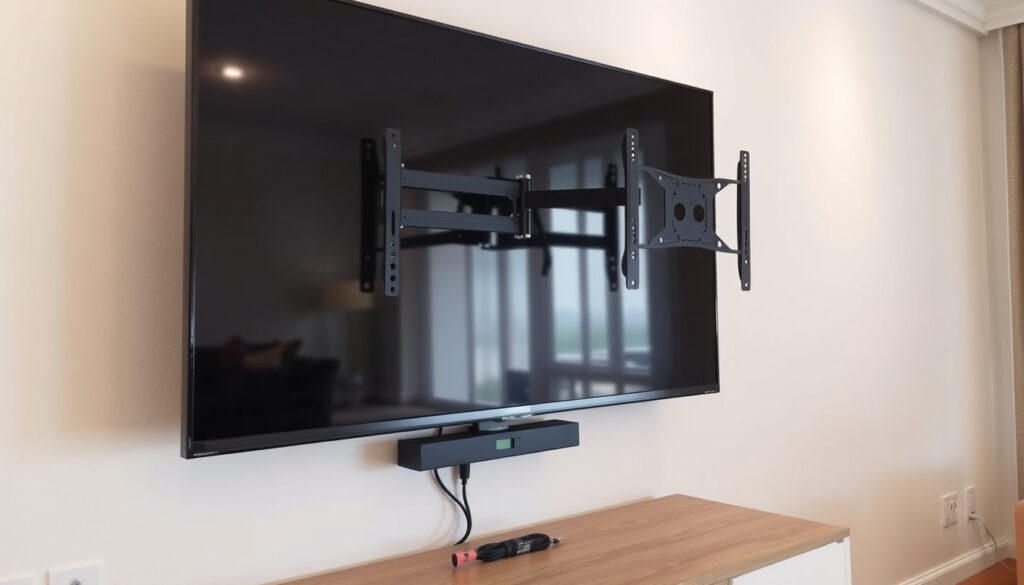
Wall Mount TV: Safety, Weight Limits & Installation Tips
You finally bought that new TV, and it’s still sitting on the entertainment stand while you stare at the blank wall above it, wondering if hanging it yourself is a weekend project or a disaster waiting to happen. Wall-mounting a TV is one of those jobs that looks simple in a 2-minute video but involves real physics, the right tools, and a few decisions about weight, wall type, and placement that most guides skip.
Recommended maximum TV weight for standard wall mounts: 110 lbs (50 kg) ·
Typical stud spacing in residential walls: 16 or 24 inches (40.6 or 61 cm) ·
Percentage of TV owners who wall mount their TV: approximately 40% ·
Average professional installation cost: $150–$300 ·
VESA standard introduced: 1997
Quick snapshot
- Most wall mounts support TVs 32–75 inches (Ergotron (display interface standards body))
- Studs are required for safe mounting of TVs over 30 lbs (Safe Kids Worldwide (children’s safety advocacy))
- VESA mounts follow standardized hole patterns (Eaton (power management and infrastructure))
- Exact weight capacity of drywall anchors varies by wall condition and installation quality
- Whether a specific TV mount will fit a non-standard VESA pattern without adapter plates
- VESA standard introduced in 1997 — nearly all TVs since then are mount-ready (Wikipedia (open reference encyclopedia))
- Check your TV’s VESA pattern and weight before buying any mount (Mount-It! (DIY mount accessories brand))
- Use a stud finder to confirm stud locations — this is non-negotiable (Mount-It! (DIY mount accessories brand))
| Label | Value |
|---|---|
| Maximum TV weight for standard mounts | 110 lbs (50 kg) |
| Common VESA patterns | 200×200, 400×400, 600×400 |
| Recommended center height from floor | 42 inches (107 cm) |
| Number of studs required for TVs >55″ | At least 2 |
| Typical stud spacing | 16 or 24 inches |
| VESA standard introduced | 1997 |
| Average DIY install time (first time) | 1–2 hours |
| Average professional installation cost | $150–$300 |
Is It a Good Idea to Wall Mount Your TV?
Wall-mounting your TV isn’t just about looking clean and modern. For many households, it’s a genuine safety improvement. Consumer Reports (product safety testing organization) has documented that wall-mounting a TV — or securing it with approved straps — can prevent injuries and deaths from tip-overs, especially in homes with young children. Safe Kids Worldwide, a children’s safety advocacy group, explicitly recommends wall-mounting flat-screen TVs to keep them from toppling off stands.
For a family with toddlers or pets, wall-mounting isn’t aesthetic — it’s the single most effective way to eliminate TV tip-over risk. That 55-inch screen weighs more than a small child and can kill when it falls.
What are the pros of wall mounting?
- Saves floor space: No TV stand or cabinet needed. That square footage opens up for other furniture or just breathing room.
- Reduces glare: You can angle the TV (with a tilting or full-motion mount) to avoid windows and overhead lights.
- Better viewing height: At the recommended center height of 42 inches from the floor, your neck stays neutral whether you’re on a couch or a recliner.
- Child and pet safety: A bolted-down mount eliminates tip-over danger entirely, unlike a stand where a child climbing or a dog bumping can topple the TV.
What are the disadvantages of wall mounted TV?
- Port access becomes a hassle: Once the TV is flush against the wall, plugging in a new HDMI cable or USB stick means pulling it off the mount — or buying an articulating arm mount that adds cost.
- Wall damage: Drilling into studs leaves holes. If you move or sell the house, patching and painting is inevitable.
- Cable management is fiddly: Running cables through the wall is the clean look everyone wants, but it often requires an electrician for code compliance (in-wall rated cables and sometimes a permit).
- Weight limits matter: A 65-inch TV averages 55–80 lbs according to current retail specs. You need a mount rated above that weight, plus studs that can handle the load.
What Kind of TV Can Be Wall Mounted?
Virtually every flat-panel TV sold since the late 2000s is mount-ready. The key is the VESA pattern — the standardized hole spacing on the back of the display.
Can any TV be put on a wall mount?
Almost yes. Ergotron (display mounting interface standards body) states that the VESA mount standard defines the four-hole attachment interface on the back of flat-panel displays and the screws used to fit those holes. As long as your TV has those four threaded holes in a square or rectangular pattern — and most do — you can find a compatible mount. Vogel’s (mounting accessory brand) confirms all of its TV mounts are compatible with the VESA Interface Standard.
If you dig out the model number and search “[your TV model] VESA pattern,” you’ll know in 30 seconds whether the mount you’re eyeing will fit. Most mounts include multiple screw sizes and spacers to accommodate different VESA patterns.
Is a 65 inch TV too heavy to mount?
Generally no, but it depends on the mount rating. Most quality mounts sold for 55–75 inch TVs have a weight capacity of 110 lbs (50 kg). A typical 65-inch OLED or LED TV weighs between 55 and 80 lbs, well within that limit. Check the spec sheet: the mount’s capacity must exceed the TV’s weight. MantelMount (articulating TV mount manufacturer) warns to stop using a mount if the wall plate pulls away or bolts shift — which indicates you’ve exceeded the safe load.
How do I know what size range my TV wall mount holds?
Mounts specify both an inch range (e.g., 32–65 inches) and a weight limit. These are independent: a 32-inch mount rated for 50 lbs won’t work for a 65-inch TV that weighs 60 lbs, even if the bolts line up. MOUNTUP (TV mounting accessories seller) explains that to check VESA compatibility, you need to verify the back of the display has four threaded holes in a square or rectangular pattern and measure the distance between them.
Can You Wall Mount a TV Yourself?
Yes — with the right tools and a methodical approach. But “can” and “should” are different questions when the result involves 50+ pounds of electronics mounted eight feet off the ground.
Can I wall mount my TV myself?
DIY mounting is a standard weekend project for anyone comfortable with a drill. The essential tool list: stud finder, drill with appropriate bits (masonry bits if going into brick or concrete), level, tape measure, socket set, pencil. Mount-It! (DIY TV mount seller) provides a guide that walks through finding studs, marking holes, drilling pilot holes, and securing the wall plate. Samsung (TV manufacturer, YouTube installation guide) also demonstrates the same sequence: locate VESA holes, attach brackets to TV, mount wall plate to studs, then hang the TV.
For anyone mounting a 55-inch or larger screen, get a helper — lifting and aligning a 60-lb TV onto a wall plate one-handed while balancing on a step stool is how accidents happen.
Samsung’s official install video specifically warns that hollow-wall installations must find a stud for each bracket. Drywall anchors won’t hold a 50-lb TV under load. If you can’t locate studs, you need a pro who can add blocking or use a rated toggle-bolt system — and even then, the safety margin is narrower.
Do I need an electrician to wall mount a TV?
You don’t need an electrician to mount the TV itself — that’s a mechanical task. But if you want cables hidden inside the wall, you likely need a licensed electrician to run in-wall rated cables and install a low-voltage outlet behind the TV. Many local building codes require this for fire safety (in-wall cables must be plenum-rated or CL2/CL3 rated). The average professional installation cost runs $150–$300, according to service provider estimates, which often includes mounting and basic cable management but not electrical work.
Where Should You Not Mount a TV?
Some places look like perfect spots but are structural or safety traps.
Where shouldn’t you mount a TV?
- Above a fireplace: Heat from the fireplace (even gas) can damage the TV’s internal electronics and warp the screen over time. The heat rises directly into the TV cavity. The higher you mount above a fireplace, the better, but you’re also ending up with the TV too high for comfortable viewing — forcing you to tilt your neck upward.
- On walls with no studs: If a stud finder shows nothing but hollow space, do not mount a TV larger than 32 inches there without adding structural blocking. Mount-It!’s safety guide says the wall type changes fastener and load decisions, including drywall over wood studs, drywall over metal studs, or masonry.
- On plaster walls without anchors: Plaster crumbles under stress. If you must mount on plaster, toggle bolts into studs are the only safe option — never use plastic expansion anchors alone.
- In corners with partial stud access: A corner mount often leaves only one side anchored to a stud. For TVs over 30 lbs, that’s insufficient.
What is the best height and placement for wall-mounted TV?
The industry standard: the center of the screen should be at eye level when seated. That’s roughly 42 inches from floor to center for a typical couch. Sitting in your actual seat, measure from the floor to your eye level — that’s your TV center height. The mount you choose (fixed, tilting, or full-motion) affects placement options. Mount-It! warns not to choose a mount type before knowing where the screen needs to land — viewing geometry comes first, then mount selection.
What Are Common TV Mounting Mistakes to Avoid?
These mistakes show up in mounting forums and customer reviews with depressing regularity. Each one is preventable.
What are the common TV mounting mistakes?
- Skipping the stud finder: Mounting directly into drywall with anchors, assuming they’ll hold a 55-pound TV. They won’t — not under the dynamic load of a tilting mount or accidental bump. Mount-It! recommends a stud-finder scan, magnet check, and small pilot confirmation to verify stud location.
- Ignoring weight limits: Using a mount rated for 60 lbs with a TV that weighs 65 lbs. The safety margin is gone. Always buy a mount with a weight capacity at least 20% above your TV’s weight.
- Wrong bolts or insufficient tightening: Every VESA mount comes with a specific set of bolts — different threads, lengths, and washers for different TV depths. Using the wrong bolt can strip the threads or leave the TV bracket loose. Mount-It!’s guide says to pick the correct spacers and screws for connecting the TV brackets.
- Mounting too high: The “TV above the fireplace” trend has produced millions of rooms where viewers crane their necks. Mounting at standing height instead of seated height is the top ergonomic error.
- Skipping the stress test: Mount-It! advises performing a stress test after installation by gently pulling and pushing the mount through its intended motion — tilting, swiveling, extending — while watching for any wall-plate movement.
How can I tell if my wall mount will hold my TV?
After installation, do the stress test. If the wall plate shifts, bolts visibly move, or you hear cracking sounds, the mount is not secure. MantelMount (articulating mount maker) states that if any bolts visibly shift or the plate pulls away from the wall, stop using the mount immediately — that’s a failure mode that can escalate without warning. The only fix: remove, locate studs properly, and reinstall.
Related reading: Women’s Jeans 2026: Trends, Fit Tips & Best Jeans for Over 50
For detailed safety specs and VESA pattern checks, refer to our complete guide to wall mounting before picking up a drill.
Frequently Asked Questions
How much does it cost to wall mount a TV?
DIY costs range from $30–$100 for a basic fixed mount plus tools (stud finder $20, drill bits $10). Professional installation typically runs $150–$300, which includes mounting and basic cable management but not in-wall electrical work. Adding an electrician for in-wall cable routing and outlet installation can add $150–$400.
What tools do I need to wall mount a TV?
The essential set: stud finder, power drill with appropriate bits (check if you’re going into wood, metal studs, or masonry), level, tape measure, socket set or screwdriver for mount bolts, and a pencil for marking holes. A helper is strongly advised for TVs over 50 inches.
Can I mount a TV on plasterboard?
Yes, but only if you fasten into the wooden studs behind it. Plasterboard alone cannot support the weight of a modern TV. Use a stud finder to locate studs, then mount into those using lag bolts. Never rely on plasterboard anchors alone for a TV mount.
Should I use a tilting wall mount?
A tilting mount is useful if the TV is mounted slightly higher than eye level — it lets you angle the screen down to reduce neck strain. If your TV is at the ideal 42-inch center height, a fixed mount works fine. Tilting and full-motion mounts cost more and add mechanical points that can wear over time.
How do I hide cables after wall mounting?
The cleanest option is running cables inside the wall using in-wall rated (CL2/CL3) cables and a low-voltage bracket, which usually requires a licensed electrician. A simpler DIY alternative is a cable raceway that matches your wall color — stick-on or screw-in channels that hide cords along the wall surface.
Can I mount a TV above a fireplace?
Technically yes, but it’s generally not recommended. Heat from the fireplace can damage the TV over time, and the mounting height is almost always too high for comfortable viewing. If you must, use a full-motion mount that pulls down and angles the screen, and check the TV’s manual for ambient temperature limits.
What is the best wall mount for a 65-inch TV?
Look for a mount rated for at least 80 lbs (ideally 110 lbs) with a VESA pattern that covers your TV’s hole spacing (400×400 is common for 65-inch screens). Fixed mounts are the simplest and cheapest; tilting and full-motion mounts add flexibility at higher cost. Brands like Sanus, Vogel’s, Mount-It!, and MantelMount have solid options with safety certifications.
For the TV owner who’s balancing a weekend project against a safety-critical investment, the decision is straightforward: mount only to studs, never exceed the weight limit, and test the mount before hanging the TV. The $150–$300 professional install becomes the obvious call for anyone without the right tools or confidence — because a fallen TV isn’t an insurance claim, it’s a wall-sized hole in your living room and a trip to the ER.
More related posts
 What Does ASMR Stand For – Meaning, Triggers, Science Guide
 Real Canadian Superstore Careers – Jobs, Pay and Hiring Guide
 Bilal Abbas Khan: Facts vs Rumors on His Personal Life
 CRA Guide: Contact, Form , and Tax Ba ic
 How to Start a Workout Plan for Beginners: Mayo Clinic 5 Steps
 The Metals Company Stock (TMC): Price, Forecast & Buy Guide
 Mariska Hargitay Biography: Children, Scars, and Tragic Story
 How to Upgrade PS5 SSD: Step-by-Step for All Models
